OnHand - a tool that is designed
to extend the functionality
of Windows hot keys.
OnHand



OnHand
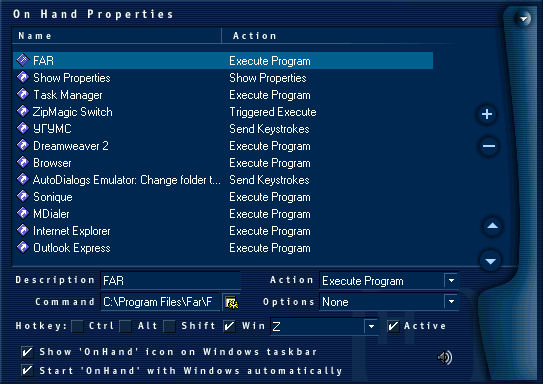
OnHand allows you to reduce time accessing frequently used actions, such as starting applications, opening documents, minimizing windows and passing keyboard commands to other applications.
You can create a shortcut with the Win button, that is not possible to do with Windows out of the box.
Tool's possibilities are considerably expanded for the user due to the use of script language for automatic executing of complex actions.
OnHand can make a hot-key combinations using 'Ctrl', 'Alt', 'Shift' and 'Win' key - modifiers. In comparison with built-in Windows functions, OnHand provides more possibilities for the choice of a hot key (~ \ / ' ; : . ,). At the same time, OnHand can show all assigned hot keys, simply by clicking on its icon on the System Tray.
OnHand supports saving and loading of various hot keys lists. These lists can even be assigned to a hot key, allowing you to set various lists to work with different applications.
Features
On Hand allows you to define hotkeys to:
-
Start applications (like control panel applets or frequently used programs) with the following options:
- Simple start of the application
- Triggered start of the applications - first call envokes one application, triggered call envokes other application
- Use only one application instance
- Close application if it is already running
- Focus on application window if it is already running
- Execute On Hand script
- Send keystrokes to other applications
- Minimize Current Window
- Maximize an active window
- Center an active window
- Move an active window to a defined position
- Change an active window size
- Make active window 'on top' (move over other windows)
- Close an active window
- Change Audio volume
- Run a Dial-up connection
- Exit Windows (Shutdown)
- Log off current user
- Restart Windows
- Switch computer in suspend mode
- Switch computer in hibernate mode
(Windows 2000 or higher) - Lock workstation
(Windows 2000 or higher)
Download
System requirements
To run OnHand, your system must meet the following requirements:
- Pentium-90 or higher processor;
- Windows 95/98/Me, Windows NT4/2000/XP, Windows Vista/7;
- 32 MB of RAM;
- Keyboard;
- 3 MB of free hard disk space.
Support
If you have not found the answer to your question - please contact us.
Awards